Watercolor Pastel Flowers Backgrounds for Creative Projects
The Gentle Allure of Hand-Painted Digital Papers
There's a particular kind of visual softness that stops a viewer mid-scroll. Watercolor pastel flowers backgrounds deliver exactly that effect. These aren't your grandmother's floral patterns—though she'd probably love them too. They sit in a sweet spot between organic artistry and digital precision, offering designers a versatile foundation that feels both personal and polished.
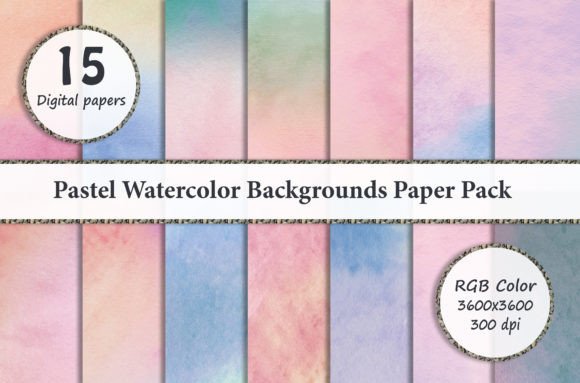
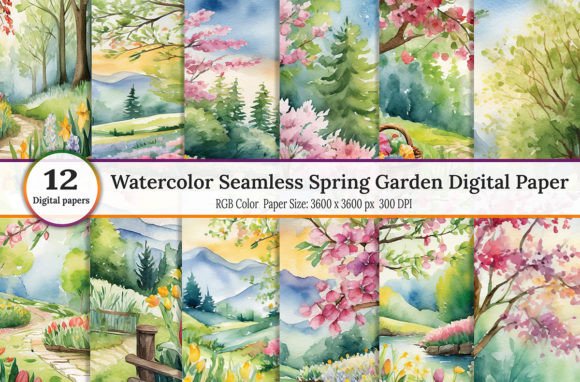
Each background in this collection captures the delicate bleed of watercolor pigment on paper. Petals dissolve into soft washes of blush pink, lavender, sage green, and buttery yellow. The edges aren't crisp or vector-perfect. Instead, they carry that beautiful imperfection you get when pigment meets water—slightly unpredictable, entirely charming. This quality gives your projects an authentic, handcrafted personality that stock photography or flat digital patterns simply can't replicate.
The pastel palette keeps things approachable without feeling childish. These backgrounds whisper rather than shout, making them ideal companions for text-heavy layouts where you need atmosphere without competition. Whether you're designing a wedding invitation suite or building out a cohesive brand identity for a boutique skincare line, the aesthetic communicates warmth, care, and attention to detail.
Where These Backgrounds Truly Shine
Let's talk practical applications, because that's where design assets earn their keep. Watercolor pastel flowers backgrounds work across an impressively wide range of projects, and understanding their strengths helps you deploy them effectively.
Digital and Print Design
For invitation design, these backgrounds are a natural fit. Baby showers, bridal events, spring garden parties, and milestone birthdays all benefit from the gentle floral aesthetic. The 3600 x 3600 pixel JPEG files at 300 dpi give you plenty of resolution for professional printing without pixelation concerns. You can scale them for everything from pocket-sized favor tags to large-format signage.
Greeting cards and stationery represent another strong use case. The watercolor style pairs beautifully with script fonts for a handwritten feel, or with clean sans serif typefaces for a more contemporary look. Small business owners creating product packaging—think soap wrappers, candle labels, or artisan food branding—will find these backgrounds add instant shelf appeal without the cost of custom illustration.
Scrapbooking enthusiasts and digital album creators appreciate the layered potential. Since these are designed for software like Adobe Photoshop and Photoshop Elements, you can blend them with other elements, adjust opacity, and build complex compositions. A quick note for Lightroom users: you'll need a plugin that supports layer functionality to work with these files as intended.
Brand and Marketing Applications
Here's where things get interesting from a strategic perspective. Backgrounds like these influence brand perception in subtle but measurable ways. A pastel watercolor aesthetic signals approachability, creativity, and authenticity. It works particularly well for brands targeting women aged 25 to 45—think wellness coaches, handmade jewelry designers, boutique bakeries, or lifestyle bloggers building their visual identity.
Social media graphics benefit enormously from having a consistent set of background options. When you're creating Instagram posts, Pinterest pins, or Facebook cover images regularly, rotating through twelve coordinating backgrounds maintains visual cohesion without monotony. The soft color palette ensures your text remains readable while the organic texture prevents your feed from looking sterile or overly templated.
For web design, these backgrounds work best as subtle hero section textures or as decorative elements in sidebar areas and footer designs. They're too visually active for dense text sections but perfect for landing pages where you want to establish mood quickly. Blog headers, newsletter templates, and digital product mockup backgrounds are all excellent candidates.
Working With These Files Effectively
Having beautiful design assets is one thing. Using them skillfully is another. Here are some practical considerations that separate good design from great design when working with watercolor pastel flowers backgrounds.
Text legibility demands attention. Watercolor textures, even soft pastel ones, create visual noise beneath your typography. Always test your text against the background at the actual viewing size—not zoomed in on your monitor. If readability suffers, try adding a semi-transparent white or cream overlay between the background and your text layer. This preserves the aesthetic while ensuring your message comes through clearly.
Color harmony matters more than you might expect. Pull accent colors directly from the watercolor washes in your chosen background. If the flowers contain hints of dusty rose and sage, use those exact tones for your headings, buttons, or decorative elements. This creates a cohesive visual system rather than a background that feels pasted on as an afterthought.
When pairing typefaces with these backgrounds, consider the visual weight. A bold sans serif font creates satisfying contrast against the organic softness. Alternatively, a flowing script font amplifies the romantic, handcrafted quality. The key is ensuring your font choice matches the project's tone—a whimsical handwritten font works for a baby shower invitation but feels out of place on a corporate wellness brochure.
Technical Tips for Best Results
Since these files arrive as high-resolution JPEGs, you have considerable flexibility. In Photoshop, convert them to smart objects before resizing to preserve quality during transformations. Use adjustment layers—particularly Hue/Saturation and Color Balance—to shift the palette slightly if the default tones don't perfectly match your project's color scheme. This non-destructive approach lets you experiment freely.
For projects requiring transparent elements or complex compositing, consider using blend modes. Multiply mode darkens the background subtly while Screen mode lightens it. These techniques let you integrate the watercolor texture with photographs, illustrations, or other design elements seamlessly.
Making These Backgrounds Work For You
The real value of a collection like this lies in versatility multiplied by quality. Twelve backgrounds at 300 dpi resolution in a standard 3600 pixel square format covers the majority of design needs from digital albums to printed merchandise. Bottle caps, t-shirt designs, cell phone covers, jewelry displays, and nail wrap patterns all fall within the supported use cases.
Before committing to any background for a project, print a test section or view it at 100% on your target device. What looks gorgeous on a calibrated desktop monitor might feel too busy on a smartphone screen, or the pastel tones might wash out on certain paper stocks. This testing step takes five minutes and saves hours of revision later.
Consider building a personal library of how you've used these backgrounds across different projects. Over time, you'll develop intuition about which compositions work best for specific applications—which arrangements pair well with serif typography, which color variations suit masculine versus feminine branding, and how much visual complexity each medium can support. That practical knowledge transforms a set of digital papers from nice-to-have assets into genuine creative tools that speed up your workflow and elevate your output consistently.